
Once you understand the basics of dental milling machines, the next question is which capabilities your lab actually needs.
A 5-axis system, wet and dry milling, a high-speed spindle, and extensive automation can all be useful. Whether they are worth paying for depends on the work your dental lab actually produces.
Start with your restorations, materials, case complexity, production volume, and existing CAD/CAM workflow. These factors determine which milling capabilities matter and which may add cost without improving daily production.
This buying guide explains how to choose a dental milling machine based on your lab workflow, from materials and milling mode to automation, cost, and technical support.
Start With the Cases Your Lab Produces
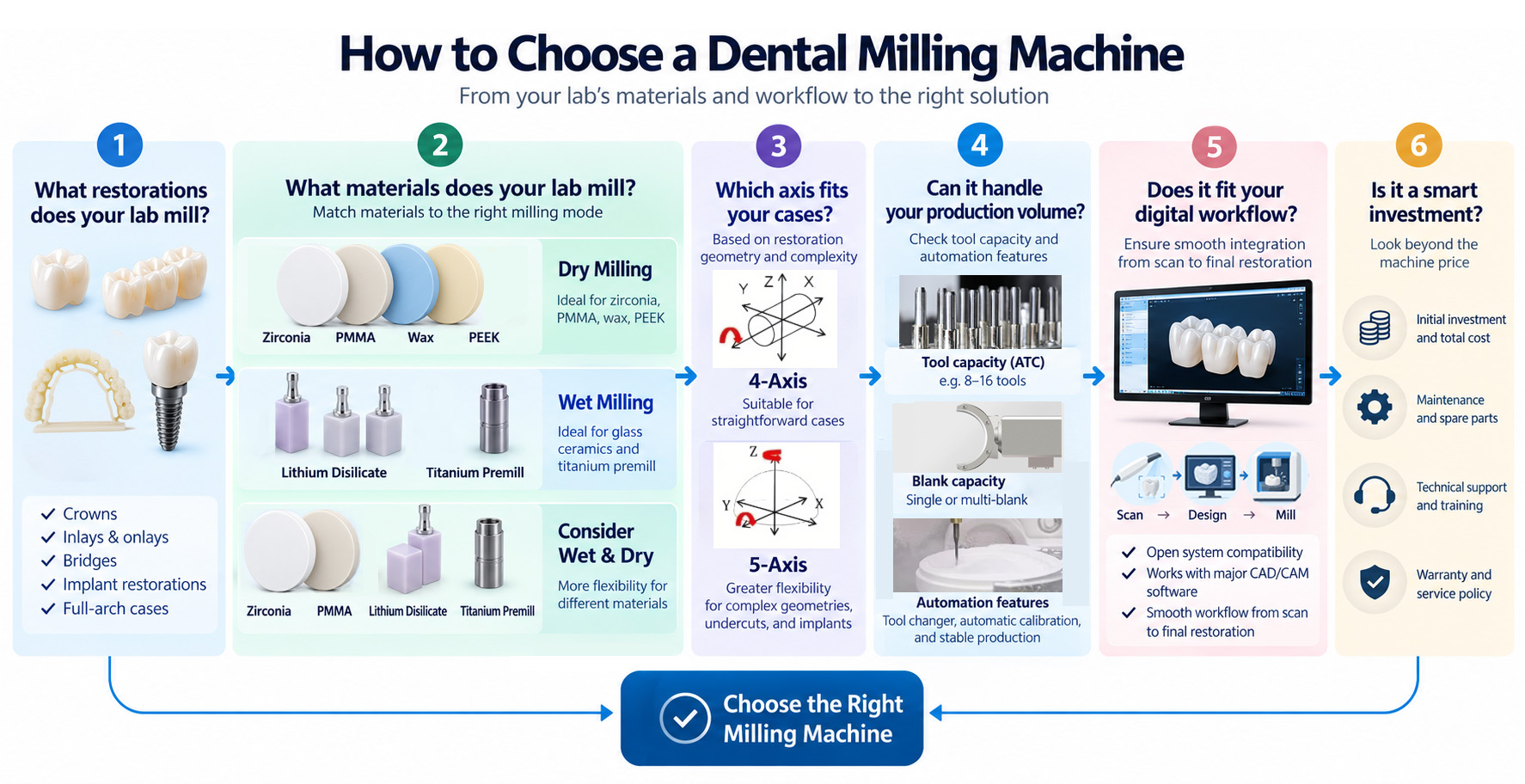
Before comparing milling machines for your lab, look at the cases you handle every day.
A lab producing mainly single crowns and standard bridges has different requirements from one handling implant restorations, angled screw channels, or complex full-arch cases.
Your typical case mix may include:
- Single crowns
- Inlays and onlays
- Short- and long-span bridges
- Temporary restorations
- Implant restorations
- Angled screw channel restorations
- Full-arch restorations
Case complexity affects how easily the milling bur can reach different areas of a restoration. Simple crowns and bridges may require less axis flexibility, while deeper undercuts and angled features place greater demands on tool access.
At this stage, the goal is not to decide how many axes you need. First identify the restorations your lab produces. Axis requirements become much easier to evaluate once you understand how complex your regular restorations are.
Look at the Materials You Mill Regularly
Material choice has a direct influence on milling mode:
A lab focused mainly on zirconia, PMMA, and wax has different machine requirements from one that regularly processes lithium disilicate or titanium premills.
One distinction is especially useful when comparing machines: materials mainly influence milling mode, while case complexity and tool access have a greater influence on axis requirements.
Choosing Between Dry, Wet, and Wet-and-Dry Milling
If your lab mainly processes zirconia, PMMA, and wax, a dry dental milling machine may cover most of your production needs. A dedicated dry workflow also avoids the coolant management and cleaning involved in wet processing.
Wet milling becomes necessary when materials in your regular workflow require coolant. Lithium disilicate is a common example. Titanium premills also require suitable wet processing, together with appropriate tooling, spindle capability, machine rigidity, and CAM support.
A wet-and-dry dental milling machine makes more sense when both types of material are a regular part of production. For example, a lab may mill zirconia daily while also producing lithium disilicate restorations or titanium implant components.
That flexibility comes with additional cleaning, coolant management, and workflow requirements. If wet materials only appear occasionally, a combined system may add complexity that the lab rarely uses.
Do You Need a 5-Axis Milling Machine?
A 5-axis dental milling machine provides greater tool access for complex restoration geometries, but that flexibility is valuable only when your cases require it.
If your lab mainly produces straightforward crowns and bridges, additional axis movement may provide limited practical benefit. The value of 5-axis milling increases as restoration geometry becomes more complex and tool access becomes more difficult.
Axis count is only part of the picture. Rotational range, workpiece access, holder design, and CAM strategy can also affect what a machine can mill.
The useful question to ask is:
Do your regular cases require the additional access of a 5-axis dental milling machine?
How Much Milling Capacity Do You Really Need?
Once a machine can handle your restorations and materials, consider how much work it needs to complete and when that work needs to happen.
Daily unit count is only part of the answer. Peak workload, turnaround time, technician availability, and whether production needs to continue outside staffed hours all affect the capacity your lab needs.
A fast milling cycle does not necessarily mean high practical throughput if technicians frequently need to load the next job, change discs, replace tools, or restart production.
Ask:
How much production needs to continue without technician intervention?
The answer will help determine whether additional automation is worth paying for.
When Is Automation Worth the Extra Cost?
Automation is valuable when it removes a real production bottleneck.
- Automatic tool changing reduces intervention when a job requires several burs or when the machine needs to run for longer periods unattended.
- Automatic disc changing allows multiple discs to be queued and becomes more useful for higher-volume production or overnight milling.
- Automatic calibration can reduce manual setup, but manufacturers may use the term differently. Check what the machine actually calibrates automatically.
- Breakpoint resume can reduce lost production when an interrupted job can continue instead of restarting from the beginning.
- Remote monitoring is most useful when production continues outside staffed hours and technicians need to check machine status without remaining beside it.
The principle is straightforward:
Pay for automation when it reduces technician intervention, increases usable capacity, or supports unattended production.
Which Specifications Really Matter for Your Lab?
Once you know the capabilities your lab needs, specifications help you judge whether a machine can deliver them.
Spindle Speed, Power, and Torque
Do not compare spindles by RPM alone.
Material, bur diameter, cutting load, feed rate, power, and torque all affect milling performance. Compare spindle capability against the materials and milling strategies you plan to use rather than choosing the highest stated speed.
Accuracy and Repeatability
Published accuracy values are not always directly comparable between manufacturers because measurement methods and test conditions may differ.
Check how the specification was measured and how the machine maintains consistent results during routine production.
Tool Capacity
More tool positions are useful when they reduce operator intervention or support the milling strategies your lab actually uses.
A larger tool magazine provides little practical benefit if most positions remain unused.
Axis Range
Two 5-axis dental milling machines can have different rotational ranges and workpiece access.
For complex restorations, check whether the machine's actual movement, holder configuration, and CAM strategy support the cases your lab handles.
Make Sure It Fits Your Existing CAD/CAM Workflow
A dental milling machine also needs to fit the digital workflow already used in your lab.
Before buying, check:
- Which CAM software supports the machine?
- Is the system open or tied to specific software?
- Are CAM licenses included?
- Are milling strategies available for your main materials?
- Which tool libraries and holders are supported?
- Will technicians need additional software training?
An open system can provide greater flexibility, but open does not mean every software, material, and milling strategy will work together automatically.
This becomes especially important when adding a new dental CAD/CAM milling machine to an established lab. Additional software, licenses, milling strategies, or training can affect both implementation time and total cost.
How Should You Compare Dental Milling Machine Costs?
Dental milling machine prices vary with milling mode, axis configuration, spindle capability, automation, software, accessories, and service.
Purchase price matters, but quotations should be compared on the same basis.
Compare What Is Included
Check whether the quotation includes:
- CAM software and licenses
- Tool holders and starter burs
- Dust extraction or coolant equipment
- Installation and calibration
- Training
- Shipping
- Warranty and technical support
A lower dental milling machine price may become less attractive when essential parts of the workflow need to be purchased separately.
Look at the Cost of Ownership
Purchase price is only one part of the cost of a dental milling machine.
Depending on the workflow, ongoing costs can include burs, coolant, filters, software licenses, maintenance, replacement components, and spindle service.
A dry zirconia workflow has different operating requirements from a wet workflow used for lithium disilicate or titanium premills. Compare what each machine will cost to operate in the workflow your lab actually uses.
What Happens When the Machine Needs Support?
A dental milling machine is production equipment. When it stops, the cost is not limited to the repair itself.
Cases may be delayed, technicians may need to adjust schedules, and urgent work may need to be outsourced. The more your lab depends on one milling machine, the more important downtime becomes.
Before buying, check warranty coverage, remote diagnosis, technical response time, spare parts availability, CAM and setup assistance, training, and support after the warranty ends.
Warranty length alone does not tell you how quickly production can resume.
If this machine stops, how quickly can my lab start milling again?
For a lab that depends heavily on in-house milling, that answer can matter more than a small difference in purchase price.
Which Type of Milling Machine Fits Your Lab?
By this point, the choice should be narrower.
There is no single best dental milling machine for every lab. Two labs milling the same material may still need different machines because their restorations, production volume, CAM workflow, and staffing are different.
Once you know which capabilities your lab needs, you can compare dental milling machines by milling mode, axis configuration, spindle capability, tool capacity, material support, automation, and price.
Questions to Ask Before You Buy
Before requesting a final quotation, ask the supplier:
- Can the machine handle the materials and restorations we produce regularly?
- Do our cases require its full axis capability?
- Which CAM software and milling strategies are supported?
- Which software, accessories, and starter tools are included?
- How much operator intervention is required during normal production?
- Can it support unattended or overnight milling?
- What routine maintenance and consumables are required?
- What exactly is included in the quoted price?
- What does the warranty cover?
- How quickly are technical support and spare parts available?
- Are installation, calibration, and operator training included?
A machine with more features is not automatically a better investment. The better choice is the one that fits your restorations, materials, production demands, and daily workflow.